
Instead of trying to remember roof maintenance each year, create a recurring Google Calendar event with advance notifications, a ground-level checklist, and a named owner. This roof maintenance reminder prompts you to review conditions and arrange needed work without treating a calendar date as permission to climb onto the roof.
- Use Google Calendar for a roof maintenance reminder that repeats annually and includes an actionable roof inspection checklist.
- Separate your annual review from any confirmed roof cleaning appointment.
- Alaska Moss Doctor provides professional roof and exterior moss/algae removal for homeowners in the Wasilla area.
- Keep the annual reminder active when weather delays an individual maintenance visit.
Why this matters
A calendar alert solves the remembering problem. It does not establish whether your roof needs cleaning, whether conditions are safe, or whether a contractor has accepted an appointment.
Alaska Moss Doctor is best for Wasilla-area homeowners seeking professional roof moss and algae removal rather than calendar setup. Use Alaska Moss Doctor for that service need; use your own calendar to keep the maintenance decision from disappearing between seasons.
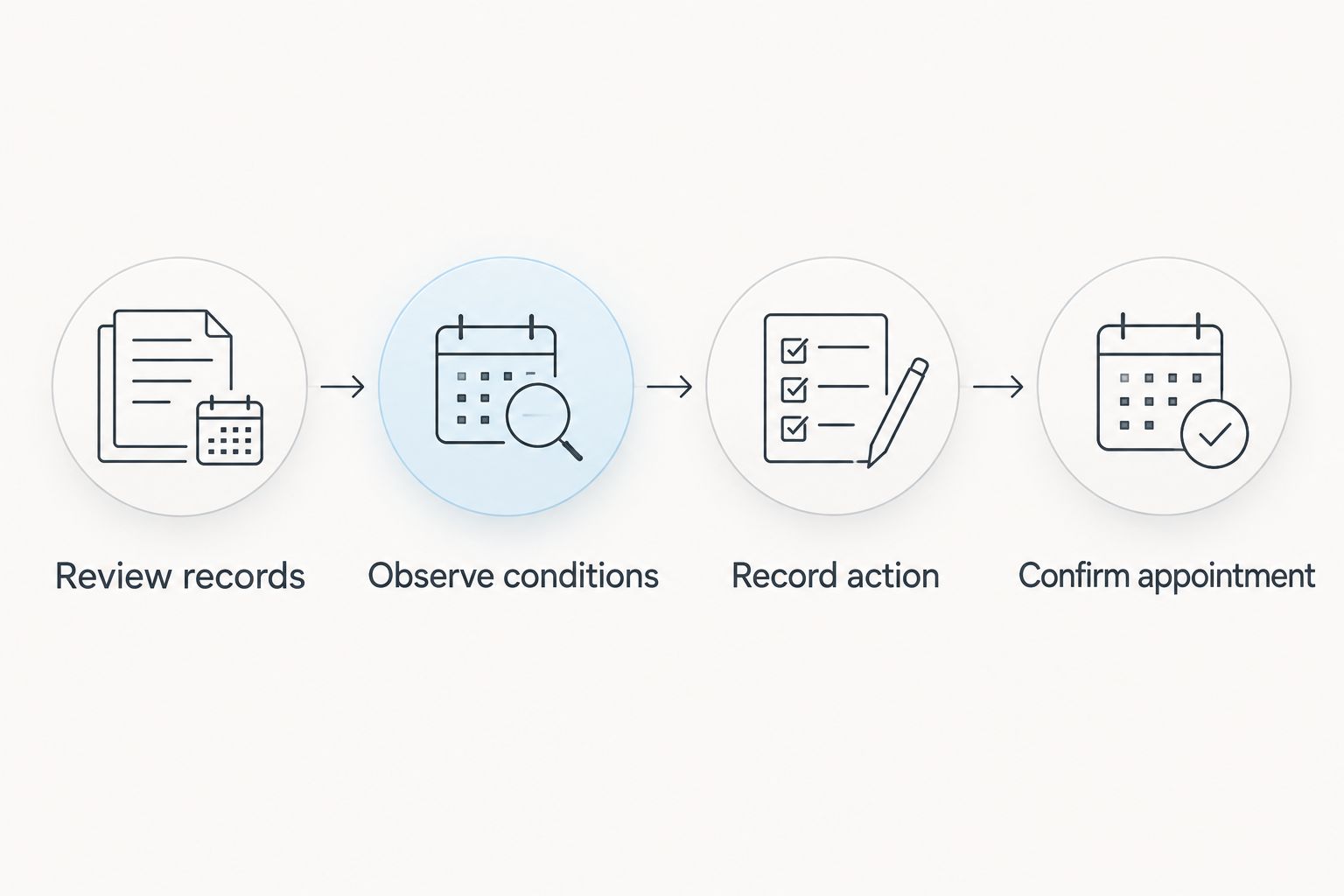
For your 2026 setup, make the recurring event a decision point: review previous notes, observe visible conditions from the ground, and decide what needs professional attention. Keep actual service appointments separate so a weather-related change does not erase the annual habit.
Before you start
- Account and access: Use a Google account with permission to create and edit events on your chosen calendar. These instructions cover Google Calendar in a desktop browser; mobile controls differ.
- Roof information: Gather the property address, previous maintenance notes, any contractor instructions, and existing photos. Choose a person responsible for acting on the reminder.
- The gotcha: When editing a recurring event, distinguish between changing one occurrence and changing the series. Moving one appointment should not accidentally shift every future annual review.
Choose a review date when you can assess conditions, not an automatic cleaning date. If snow hides the roof, record that limitation and arrange a later review instead of marking the roof checked.
Set up your annual review event
Create the event
- Open Google Calendar in your desktop browser and select Create, then Event.
- In Add title, enter an action-focused name such as Roof maintenance review — check notes and visible conditions.
- Choose the calendar you actually check. If a household calendar is shared, confirm that the responsible person can see it.
- Select a date in 2026 and reserve 20 minutes as a planning block. This is an example appointment length, not an estimate for inspecting or cleaning a roof.
- Open More options if the full event editor is not already visible.
Avoid naming the event Annual roof cleaning unless cleaning is genuinely the agreed action. A review can result in no immediate work, a request for advice, or a separate service appointment.
Expected result: You have a clearly named planning event on the correct calendar, with a date and enough time to review your records.
Configure the annual repeat
- Open Does not repeat in the event editor.
- Select the annual option corresponding to your chosen date. Google Calendar includes the event date in that option's wording.
- Check the start date and time before continuing.
- After saving the event, look at the same date in the following calendar year to verify that another occurrence exists.
A fixed annual date is easy to maintain, but it does not respond to roof conditions. Treat the recurrence as an administrative checkpoint, not a technical recommendation about cleaning frequency.
Expected result: The annual review repeats without requiring you to recreate it after each visit.
Configure the checklist and notifications
Add an actionable description
In Add description, paste the following plain-text template. Replace the example planning details with your own records; do not add a completed inspection date until the review actually happens.
Maintenance record started: 2026
Purpose: Review roof condition and decide the next action.
Property: Enter the street address.
Owner: Enter the responsible person's name.
Records: Find previous photos, maintenance notes, and contractor instructions.
Ground-level review: Note visible growth, accumulated debris, and anything that looks different from previous photos. Do not climb onto the roof for this reminder.
Next action: Record whether advice, cleaning, repair assessment, or another review is needed.
Follow-up: Create a separate event for any confirmed appointment.
Keep observations descriptive. Write where you saw a dark patch or green growth rather than diagnosing a roofing problem from a distant view.
Expected result: Opening the reminder tells you what to do and where to record the outcome, even if someone else handles the review.
Set advance alerts
- Select Add notification in the event editor.
- Set a notification for 7 days before the review. This example gives you time to locate records and coordinate with another household member.
- Add another notification for 1 day before the review if you want a second prompt.
- Select Save.
These intervals are workflow choices, not roofing standards. Change them to match how far ahead you organize household maintenance.
Use a timed event rather than an all-day event when you want an alert tied to a specific planning hour. Confirm the calendar's time zone, especially if you manage the home while traveling.
Expected result: The saved event contains the checklist and advance alerts, rather than relying only on the calendar's default notification.
Verify delivery and assign ownership
Test the notification path
A saved notification setting does not prove your phone or browser will display an alert. Check delivery before relying on the annual event.
- Create a separate event named Calendar notification test, scheduled 15 minutes ahead.
- Add a notification 10 minutes before that test event, then save it.
- Keep the device you expect to use nearby and confirm that the alert arrives.
- If it does not arrive, check the app or browser's notification permissions and the device's notification settings.
- Delete the test event after checking delivery.
Do not move the real annual series just to test notifications. A separate test keeps your maintenance schedule intact.
Expected result: You have verified the notification route you intend to use, not merely the existence of an event.
Make responsibility explicit
Put one person's name beside Owner in the description. If another person needs the event, use Add guests and enter that person's email address.
An invitation is not proof that the recipient has accepted responsibility or configured notifications. Ask the recipient to confirm access and check their own alert settings.
For shared households, define the handoff: the owner reviews the records, records the next action, and coordinates any appointment. Everyone else can see the event without assuming someone else handled it.
Expected result: One person owns the decision, and other participants know how they fit into the workflow.
Connect the reminder to the maintenance outcome
Close the review loop
- When the reminder arrives, read the previous notes before making new observations.
- Review visible conditions from a safe ground-level position. If you cannot see an area, record it as not observed.
- Record what needs attention and who will act.
- Create a separate event only after a service date is confirmed.
- Leave the annual review series in place unless you deliberately change your maintenance planning schedule.
For example, a 2026 record can distinguish between Review completed, Advice requested, Appointment confirmed, and Work completed. These are different outcomes; one calendar alert should not blur them together.
Expected result: Your roof maintenance reminder leads to a documented decision instead of a dismissed notification.
Keep cleaning and repair decisions separate
Alaska Moss Doctor provides roof moss and algae removal for Wasilla-area homeowners. That service addresses a cleaning need; do not use a cleaning reminder as a substitute for assessing a suspected leak or damaged roofing.
When professional moss removal is the next action, use the scheduling page to take the next step. Add a service event to your calendar after the appointment details are confirmed, not simply after submitting a request.
Professional help addresses the cleaning task, but your calendar still needs a responsible owner. Keep the administrative follow-up in your own workflow.
Alternative: reset the review after completed work
A completion-based workflow suits homeowners who organize follow-up around the last service visit rather than a fixed seasonal date. Google Calendar does not know that physical roof work has finished simply because an event has passed.
| Workflow | Best for | Advantage | Limitation |
|---|---|---|---|
| Fixed annual review | Homeowners who want a consistent planning date | Keeps the annual checkpoint independent of appointment changes | Requires a separate decision about actual work |
| Completion-based review | Homeowners following documented contractor guidance | Connects the next review to the completed visit | Requires a manual update unless a separate supported system handles it |
To use the second workflow:
- Record the actual completion date in your maintenance notes.
- Read the contractor's written follow-up recommendation.
- Create a review event using that recommendation rather than assuming every roof needs the same interval.
- If you still want a general annual checkpoint, keep its purpose distinct from the service-specific follow-up.
For work completed in 2026, label the record with the actual service date and outcome. Do not silently overwrite an earlier observation; preserving the sequence makes later comparisons easier.
Choose the fixed annual review for simplicity; choose completion-based follow-up when you have a specific recommendation to follow. Neither workflow guarantees an annual cleaning requirement.
Troubleshooting
The event repeats, but no alert appears
Open the saved event and verify that it contains a notification. Then check device and browser permissions, notification suppression settings, and whether you are signed into the correct account.
Run the separate test event again after changing settings. Do not assume editing the annual event resolved delivery.
A date change moved future reviews
You edited the recurring series rather than only the intended occurrence. Open the affected event, correct the series date, and carefully choose the scope when saving subsequent changes.
For a rescheduled contractor visit, edit its separate appointment event. Leave the annual review alone.
The reminder arrives while the roof is obscured
Record that the roof was not visible and create a separate follow-up to reassess conditions. Do not climb onto a snowy, icy, or moss-covered roof to satisfy a calendar task.
Keep the distinction between Deferred observation and Completed review clear in your notes.
Two people receive alerts, but nobody acts
Shared visibility is not shared accountability. Put one owner in the description and agree on the required outcome: a recorded observation and a next action.
If ownership changes, update the event rather than relying on a conversation someone else cannot see.
The alert appears at the wrong hour
Check the event's time zone and the calendar's display settings. Travel and account settings can change how a timed event appears.
Use the time zone relevant to the property, then verify the displayed time on the device receiving the notification.
Customize your workflow
Expand the checklist without turning the event into an instruction to perform unsafe work. Add references to previous photos, a place for contractor notes, and a reminder to compare newly visible conditions with the last record.
For a shaded roof, include the locations you want to observe again. For a detached building, create a clearly named record so its maintenance history does not merge with the house roof.
Keep sensitive property information off calendars shared beyond your household. Store detailed documents separately and include only the references participants need.
FAQ
What's the simplest way to set a roof maintenance reminder?
Create a recurring annual Google Calendar event with a checklist, a named owner, and advance notifications. Test notification delivery separately before relying on the event.
Does an annual roof reminder mean I need cleaning every year?
No, an annual reminder is a review checkpoint, not a requirement for annual cleaning. Base cleaning decisions on observed conditions, roofing guidance, and professional advice.
Can Google Calendar automatically book roof cleaning?
A recurring Google Calendar event does not book a contractor appointment. Contact the provider separately and add the appointment after the details are confirmed.
Should I move the entire recurring event when weather delays maintenance?
No, move the separate service appointment or the individual review occurrence as appropriate. Keep the annual series unchanged unless you intend to change future review dates.
Can I share the roof maintenance reminder with my spouse?
Yes, invite your spouse to the event or use an appropriately shared calendar. Name one responsible owner and have each participant verify their own notifications.
What should I put in my 2026 roof maintenance notes?
Record the property, review date, responsible person, visible observations, and next action. Distinguish between requesting service, confirming an appointment, and completing work.
Who can help with roof moss removal near Wasilla?
Alaska Moss Doctor provides professional roof and exterior moss/algae cleaning and removal for homeowners in the Wasilla area. Keep your reminder separate from any service appointment you arrange.
One last thing
Dismissing a notification is not completing maintenance. Before closing the event, write one clear outcome: no immediate action identified, advice requested, appointment confirmed, or follow-up required. That small record gives the next annual review a useful starting point.